
Most businesses do not fail at digital marketing because they lack traffic. They fail because they have no idea what that traffic is doing after it arrives.
Your website can get thousands of visitors from Google Ads, SEO, Meta Ads, or LinkedIn campaigns. But if you cannot tell which individual click turned into a qualified lead, a phone call, a WhatsApp message, or an actual sale, you are not marketing—you are gambling.
This is where your measurement setup becomes the dividing line between blind spending and evidence-based growth. It connects your website, your ad platforms, and your CRM so you can clearly see what is driving sales, what is wasting cash, and exactly where you are losing potential customers.
For any business competing in intense markets like Dubai or Abu Dhabi, this is not just a technical checklist. It helps you answer the big questions: Should you spend more on Google Ads? Are your Facebook ads bringing in real buyers or just cheap, junk inquiries? Are your SEO leads high quality?
Without accurate tracking, you are guessing. With it, you run your marketing based on hard evidence.

The Reality of Defining a “Conversion”
Many businesses assume that a conversion is a one-size-fits-all metric, usually tied to a direct online sale. In reality, during our analytics audits across the GCC, we find that defining a conversion depends entirely on how your specific business generates revenue.
We often see this break down across three distinct categories:
- For service businesses or B2B firms: It is a filled-out contact form, a direct WhatsApp click, a phone call, or a booked consultation.
- For an e-commerce store: It is a completed purchase or a recurring subscription signup.
- For a software company (SaaS): It is a free trial signup or a demo request.
To put it in human terms, tracking answers the ultimate marketing question: What did they do after they clicked my ad?
Behind the scenes, this works using small pieces of code (often called tags or pixels) and cookies that pass data to platforms like Google Analytics 4, Google Ads, or Meta. But from a business perspective, it is the only way to calculate your true Customer Acquisition Cost (CAC) and protect your profit margins.
Why This Dictates Your Bottom Line
Without tracking, you are forced to look at “vanity metrics” like impressions, clicks, and traffic. These numbers look great in monthly reports, but they do not pay the bills.
We often see companies blinded by a Facebook campaign that gets a massive number of cheap clicks but brings in zero sales. Conversely, a highly optimized Google Ads campaign might look expensive per click, but it could deliver the biggest corporate client of your quarter.
Tracking gives you the context behind the numbers. It shows you which channels are profitable and alerts you to operational issues—like a broken contact form that is quietly killing your sales funnel.
A Quick Real-World Check: During our audits, we rarely find that companies lack data. Instead, they have too much disconnected data. Google Ads says one thing, Meta says another, and their internal sales team sees a completely different reality. While different platforms will always have slight data gaps due to how they count actions, a proper setup gives you a clean, unified baseline to make smart investment decisions.
The Feedback Loop: How Data Moves
The actual process behind a reliable tracking system follows a very logical journey:
- The Visit: A potential customer arrives on your site from a Google ad, an organic search, a social media post, or an email.
- The Source: Tracking scripts identify exactly where that user came from.
- The Action: The user completes a goal, like clicking your phone number or submitting an inquiry.
- The Signal: A tag triggers and sends that specific action back to your ad platform or CRM.
- The Optimization: Your marketing team uses that data to stop wasting money on bad keywords and double down on the ones that convert.
To keep your website clean and fast, we usually manage all of these different tracking scripts inside a single tool called Google Tag Manager (GTM), rather than hard-coding dozens of files directly into your website source code.

Macro vs. Micro Conversions: Balancing the Scale
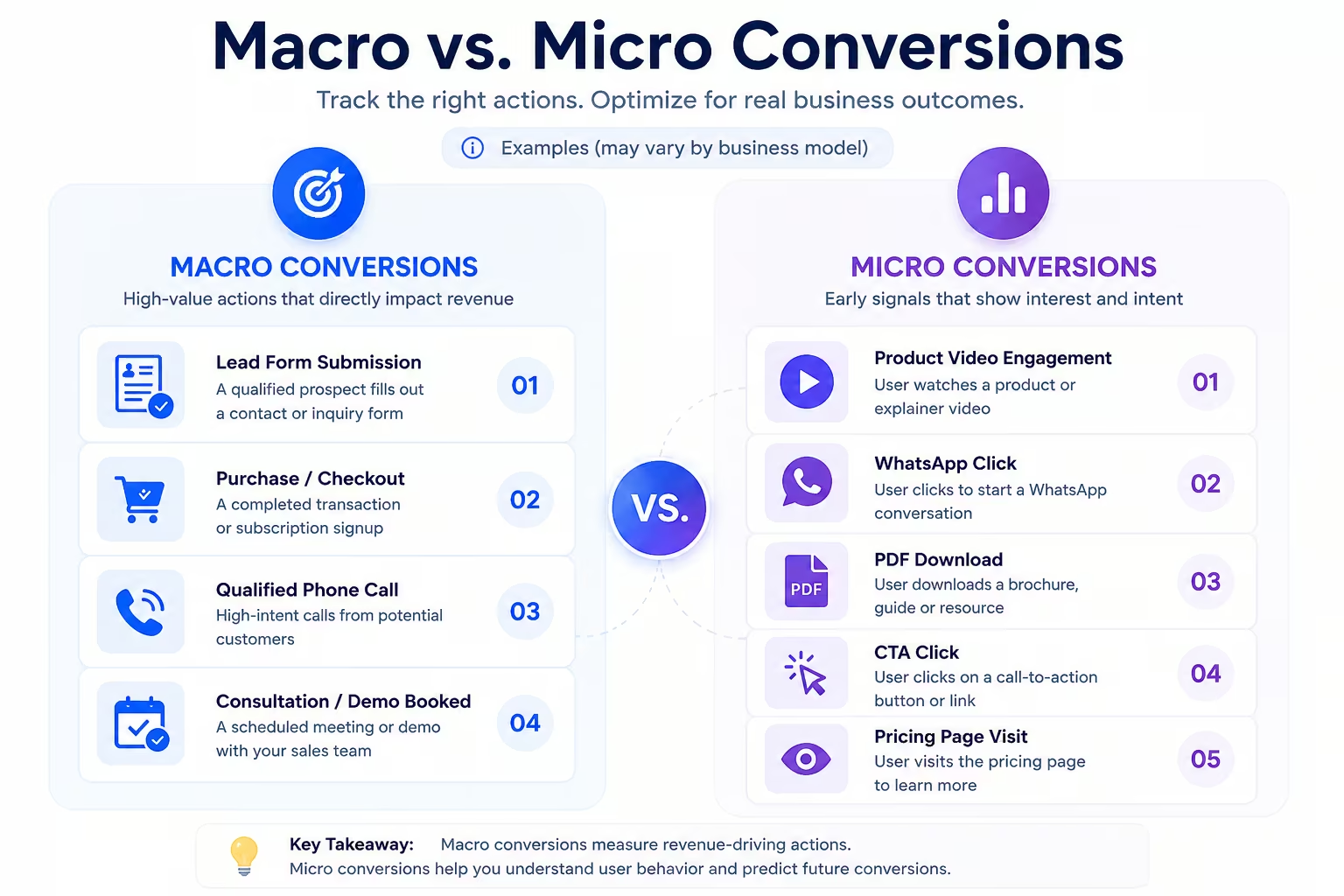
One of the biggest mistakes we see in ad account setups is treating every user action with the same level of importance. You should only track things that match how your business actually makes money, separated into two distinct tiers:
Macro Conversions (The Main Goals)
These are the big milestones that directly impact revenue—like a completed checkout, a high-intent lead form submission, a real phone call, or a signed corporate agreement.
Micro Conversions (The Buying Signals)
These are smaller steps that show a user is interested but not quite ready to buy yet—like clicking to chat on WhatsApp, downloading a PDF brochure, or watching a product video.
Both are helpful, but you should never mix them up when telling ad networks to optimize your campaigns. If you treat a simple video view or a WhatsApp button click the same as a hot lead form submission, the ad algorithms will optimize for window-shoppers instead of actual buyers. This usually ruins Smart Bidding performance, as Google’s machine learning begins hunting for cheap button-clickers rather than actual revenue.
The Components of a Professional Tracking Setup
Building a reliable data setup involves deploying specific tools to solve distinct tracking gaps. Here is how those pieces fit together in a practical setup.
Google Ads & GA4 Tracking
This measures exactly what happens after someone clicks a paid search or video ad. It is essential for training Google’s automated bidding tools. By pairing it with Google Analytics 4 (GA4), you get a full view of how your paid traffic behaves compared to your organic SEO traffic.
Optimize Your Spend: Stop overpaying for low-intent traffic. Clean up your setup by reading our practical Google Ads Conversion Tracking Guide.
Meta Pixel & Conversions API
This tracks traffic from Facebook and Instagram. Today, relying only on a standard browser pixel is risky because of ad blockers and privacy updates. Combining it with Meta’s server-side Conversions API ensures you do not lose track of your leads.
Enhanced Conversions
This feature inside Google Ads fixes tracking gaps caused by modern browser privacy restrictions. When a user fills out a form, the system securely hashes their email or phone number (using the SHA-256 algorithm) and matches it back to their logged-in Google account, restoring lost attribution data safely.
Server-Side Tracking
Instead of loading your website down with dozens of heavy tracking scripts that slow your page speed, server-side tracking sends one clean stream of data to a secure cloud server under your own domain, which then distributes it to Google or Meta. This keeps your website incredibly fast and improves data security.

The Data Layer
Think of the Data Layer as an organized, invisible spreadsheet built into your website that translates your business data into a format Google Tag Manager can easily understand. It safely passes information like product prices, currencies, or service types without relying on fragile website scraping that breaks whenever you change your site design.
Offline Conversion Tracking (CRM Integration)
If you run a business where sales are closed offline by a team—like real estate developments in Dubai Marina, medical consultations, or corporate services—web forms are only half the story. Offline tracking creates a bridge between your website and your CRM (like HubSpot or Salesforce). When a lead moves from “form submitted” to “deal closed” weeks later, your CRM tells the ad platform. This trains the ad algorithms to hunt for actual revenue rather than just raw lead volume.
Phone Call & WhatsApp Tracking
In the UAE, direct phone calls and WhatsApp chats are often your highest-value leads. Using technology like Dynamic Number Insertion (DNI), your website can show a unique phone number to different visitors based on how they found you, tracing a phone call right back to the exact keyword they typed into Google.

Cross-Domain Tracking
If your customer journey requires users to move between different domains—for instance, starting on your main site, moving to a third-party booking system, and finishing on a payment gateway—you need cross-domain tracking. Without it, your analytics tool will assume the user left and a new one arrived, completely ruining your marketing attribution.
4 Common Tracking Mistakes That Cost You Money
During our standard account audits, we rarely find that tracking is completely missing. Instead, we encounter systems that pass corrupted, duplicate, or misleading data back to the ad platforms.
1. Tracking the Wrong Things as Primary Goals
Setting up a simple button click or general page view as a primary conversion teaches ad networks to find people who click around aimlessly, not people who actually buy. This is a classic issue where agencies look good on paper by reporting hundreds of “conversions” while the client’s internal sales team sees zero growth in actual business.
2. Duplicate Conversion Firing
If your “Thank You” page triggers a conversion based purely on a standard URL, a user might bookmark that page or refresh their browser later. Every time they do, a new conversion fires. This falsely inflates your ad reports, creates massive discrepancies between platform data and reality, and tricks automated bidding models into optimizing for historical refreshes instead of net-new customers.

3. Ignoring Multi-Touch Journeys
Most customers do not buy on their first visit. If you use a strict “Last-Click” model, you might accidentally turn off the early-stage discovery campaigns that introduced customers to your brand in the first place. You need an attribution framework that respects the full journey from initial search down to the final conversion.
4. Website Redesigns That Break Scripts
This happens constantly. A business updates their landing pages or changes a contact form plugin without telling their analytics team. The designers push the new site live, completely forgetting that the old tracking tags were tied to specific button IDs or URLs. Tracking drops to zero overnight without warning, leaving your live ad campaigns running completely blind.
The Next Step for Your Business
A reliable tracking setup is the absolute foundation of profitable digital marketing. If you are operating in highly competitive arenas across Dubai and the wider GCC, ad costs can add up fast. Accurate data is your only real protection against wasted spend.
Before you decide to double your marketing budgets or overhaul your landing page copy, make sure your measurement systems are flawless. If you want an objective look at your current setup, our analytics engineering team at HDMarketing is here to run a comprehensive, real-world audit for your business.