Running a Google Ads campaign without accurate tracking is like evaluating a physical store’s sales team based entirely on foot traffic. Clicks, impressions, and sudden traffic spikes might look encouraging in a weekly report, but they fail to answer the only question that impacts your bottom line: Did that traffic actually turn into revenue?
When you increase your ad spend without a reliable way to measure outcomes, scale quickly becomes your enemy. A clean tracking setup changes everything. It bridges the gap between blind spending and evidence-based growth, turning your budget into a measurable system for acquiring customers.
Why Missing Conversion Data Breaks Smart Bidding
Many businesses assume that managing Google Ads is still a matter of manually adjusting keyword bids. Today, automated bidding plays a central role in how campaigns are optimized. If your tracking is broken, duplicated, or built around the wrong actions, you are giving Google’s bidding systems poor signals to work with.
During our ad account audits across Dubai and the UAE, we often find teams celebrating a low Cost-Per-Click (CPC). But a cheap click that never converts is far more expensive than a premium click that turns into a high-value client.
If you’re trying to understand how CPC, lead quality, and campaign economics interact in the UAE, our guide to Google Ads cost in Dubai breaks down what actually drives advertising costs.
Accurate tracking changes how your account performs in two specific ways:
- Calculating Real Customer Acquisition Costs: Instead of guessing, you can measure your Cost Per Acquisition (CPA), conversion value, and Return on Ad Spend (ROAS) against actual business outcomes. This keeps advertising costs connected to the value customers generate.
- Training Google’s Smart Bidding Systems: Strategies such as Target CPA, Target ROAS, Maximize Conversions, and Maximize Conversion Value rely on conversion signals to make bidding decisions. If the account records low-quality actions as valuable outcomes, the system can become increasingly effective at finding more of the wrong users.
Good bidding starts with good measurement.
What Counts as a Conversion in Google Ads?
We frequently see account managers mistake website activity for campaign success. In Google Ads, a useful conversion should represent a meaningful action that moves a prospect closer to becoming a customer.
In competitive lead-generation markets across Dubai and the broader GCC, a conversion rarely means an immediate online payment. In practice, Google Ads measurement commonly revolves around actions such as:
- High-Intent Form Submissions: Qualified enquiries requesting quotes, booking consultations, or submitting detailed briefs.
- Inbound Calls: Phone interactions generated from ads, call assets, or landing pages.
- WhatsApp Enquiries: Clicks that initiate conversations with your sales team, particularly when WhatsApp plays an important role in the customer journey.
- E-commerce Transactions: Completed purchases, recurring subscriptions, or other transactions with measurable commercial value.
Not every action deserves equal importance.
A brochure download, pricing-page visit, or WhatsApp button click may be useful for understanding behaviour, but that does not automatically mean Google Ads should optimize bidding toward it.
When you separate genuine business outcomes from supporting engagement signals, it becomes much easier to see which campaigns, search terms, and audiences generate commercial value and which ones simply consume budget.
Need structural guidance? If you want to refine how your campaigns are built around these goals, explore our breakdown of account architecture on our Google Ads Services page.
How to Set Up Google Ads Conversion Tracking Step by Step
A reliable Google Ads setup starts with defining the business outcome—not installing a tag.
Before opening Google Tag Manager or adding scripts to your website, decide what you actually want Google Ads to learn from.

Step 1: Define the Conversion Action
Start by identifying the outcome that represents real business value.
For a lead-generation company, that might be:
- A completed enquiry form
- A booked consultation
- A qualified inbound call
- A sales-qualified lead
- A closed deal
For an e-commerce business, the most important action will usually be the completed purchase.
Avoid making generic page views, button clicks, or short sessions your main optimization goals unless they have a demonstrated relationship with revenue.
Step 2: Create the Conversion Action in Google Ads
Inside Google Ads, create the conversion action that corresponds with the business outcome you want to measure.
At this stage, review the settings carefully rather than accepting defaults without considering what they mean.
Important configuration decisions include:
- Conversion category
- Conversion value
- Count setting
- Primary or Secondary status
- Attribution settings
- Conversion window
These settings influence both reporting and how the conversion may be used by automated bidding.
Step 3: Choose the Measurement Method
There is no single implementation method that fits every website.
Depending on your site, conversions can be measured through:
- Native Google Ads website tracking
- Google Tag Manager
- Google Analytics events shared with Google Ads
- Enhanced Conversions
- CRM and offline conversion integrations
The correct choice depends on the type of conversion, your website setup, your analytics environment, and whether the sale happens online or later through a sales team.
Step 4: Configure the Trigger Around the Completed Action
Your tag should fire when the conversion actually happens—not merely when someone begins the process.
For example, a lead-generation conversion should normally fire after a form has been successfully submitted rather than when the visitor clicks the Submit button.
For purchases, the conversion event should be tied to a confirmed transaction and should pass the appropriate transaction data.
The more accurately the trigger represents the real outcome, the cleaner your bidding data becomes.
Step 5: Configure Conversion Values and Counting
Decide whether every conversion has the same business value or whether different transactions and leads should carry different values.
Then decide whether Google Ads should count one or every conversion after an ad interaction.
These settings should reflect how your business actually creates value rather than what makes campaign reports look stronger.
Step 6: Decide Which Actions Should Influence Bidding
Classify conversion actions as Primary or Secondary based on their role in campaign optimization.
A high-value lead or completed purchase might be Primary. A brochure download or supporting engagement event may be better kept as Secondary for observation.
Review campaign goals as well. Conversion action settings alone do not tell the whole story when custom goals or campaign-specific goals are involved.
Step 7: Test the Implementation Before Scaling Spend
Use tools such as Google Tag Manager Preview Mode and Google Tag Assistant to perform the conversion yourself.
Verify that:
- The intended event fires
- It fires at the correct moment
- It does not fire multiple times accidentally
- Conversion values are passed correctly
- Transaction IDs are present where necessary
- User-provided data is configured correctly when Enhanced Conversions is enabled
Do not assume that seeing a tag fire means the measurement setup is correct.
Step 8: Verify the Data Inside Google Ads
After implementation, review the conversion action and its diagnostics inside Google Ads.
Watch for missing data, unexpected drops, sudden spikes, duplicate events, or conversion values that do not match backend revenue. Tracking should be monitored as an ongoing system, not treated as a one-time installation task.
Step 9: Compare Google Ads Against Your Backend
Finally, compare your advertising data against the system your business trusts for real outcomes—whether that is your CRM, e-commerce platform, booking software, or internal sales database.
The numbers will not necessarily match perfectly because the systems may use different attribution and reporting logic. But large, unexplained differences should be investigated before you make major budget decisions.
Technical Implementation Methods Compared
The right technical method depends on what you are tracking and how your website and sales process are structured.
| Tracking Method | Primary Use Case | Key Implementation Advantage |
| Native Google Ads Tracking | Direct Google Ads website measurement | Provides a direct conversion signal for Google Ads |
| Google Tag Manager (GTM) | Flexible tag and trigger management | Lets teams manage tags, variables, and triggers without repeatedly modifying site code |
| GA4 Event Sharing | Analytics-led measurement environments | Allows eligible Analytics events to be used as Google Ads conversions |
| Enhanced Conversions | Improving measurement using first-party customer data | Adds additional matching signals to eligible conversion measurement |
| Offline Conversion / CRM Integration | Long sales cycles and offline outcomes | Connects advertising activity with qualified leads, sales stages, and closed revenue |
The strongest setup is not necessarily the one with the most tools. It is the one that sends the cleanest representation of business outcomes back to the advertising platform.
Native Google Ads Tracking vs. GA4 Event Import
One of the most frequent debates during account audits is whether conversions should be measured directly for Google Ads or created from Google Analytics events.
Sharing GA4 events with Google Ads can simplify measurement when your analytics implementation is already mature and you want greater consistency across reporting systems.
However, we generally prefer direct Google Ads conversion measurement when Google Ads bidding performance is the primary objective.
Google Ads and Google Analytics can differ in attribution, reporting logic, counting configuration, and when conversions appear in reports. That means you should not expect the two platforms to produce identical numbers.
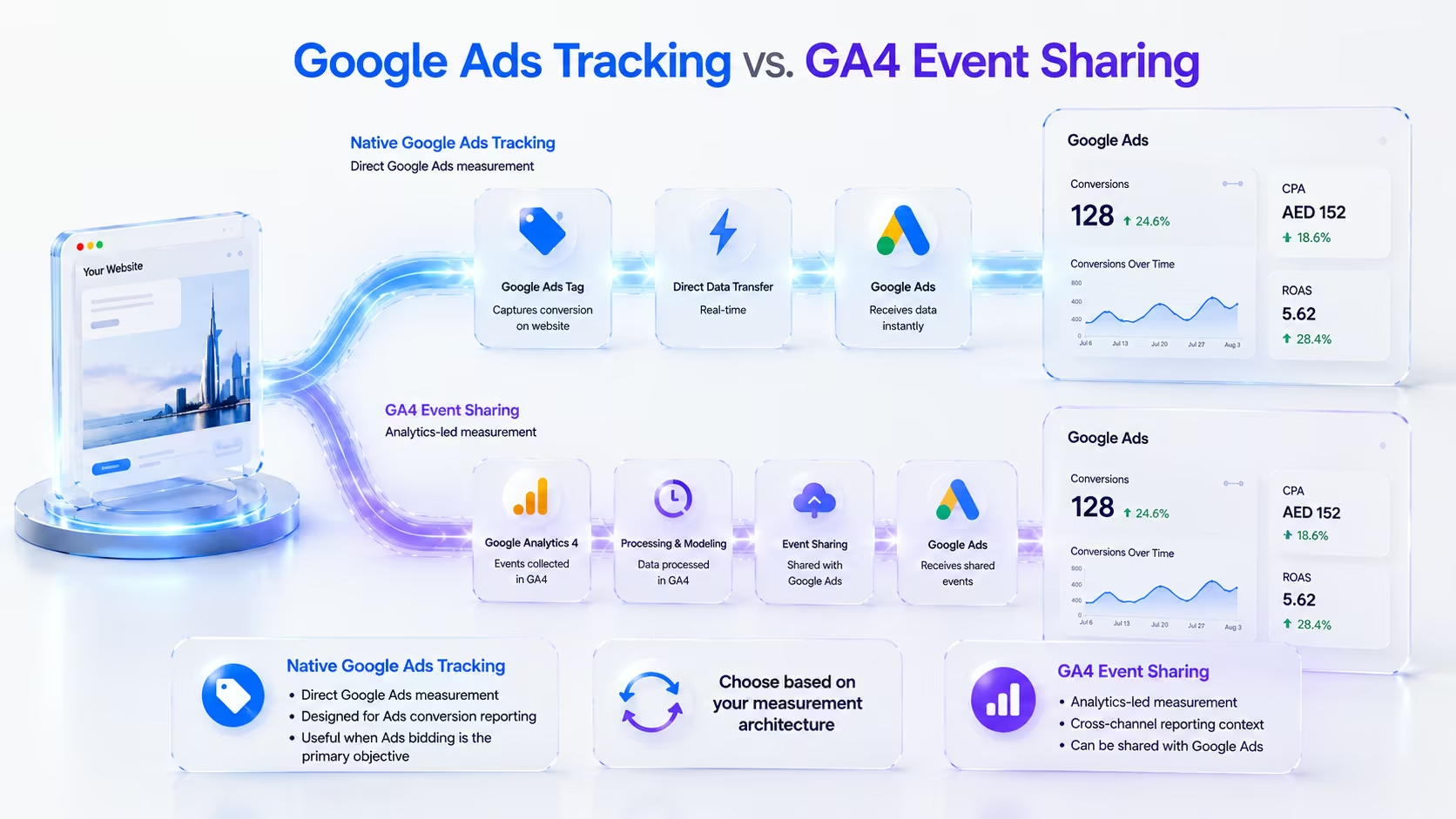
For accounts where bidding accuracy is critical, we typically use Google Ads conversion actions as the primary optimization signal while retaining GA4 for broader behavioural analysis and cross-channel reporting.
This is not an argument for abandoning GA4. The two platforms answer different measurement questions:
- Google Ads helps answer: Which advertising interactions should influence paid-media optimization?
- GA4 helps answer: How are users behaving across the wider website and marketing ecosystem?
Treating those jobs separately often produces a cleaner setup.
Configuring Primary vs. Secondary Conversion Actions
One of the fastest ways to waste advertising budget is treating every measured action as equally important.
Google Ads allows conversion actions to serve different roles:
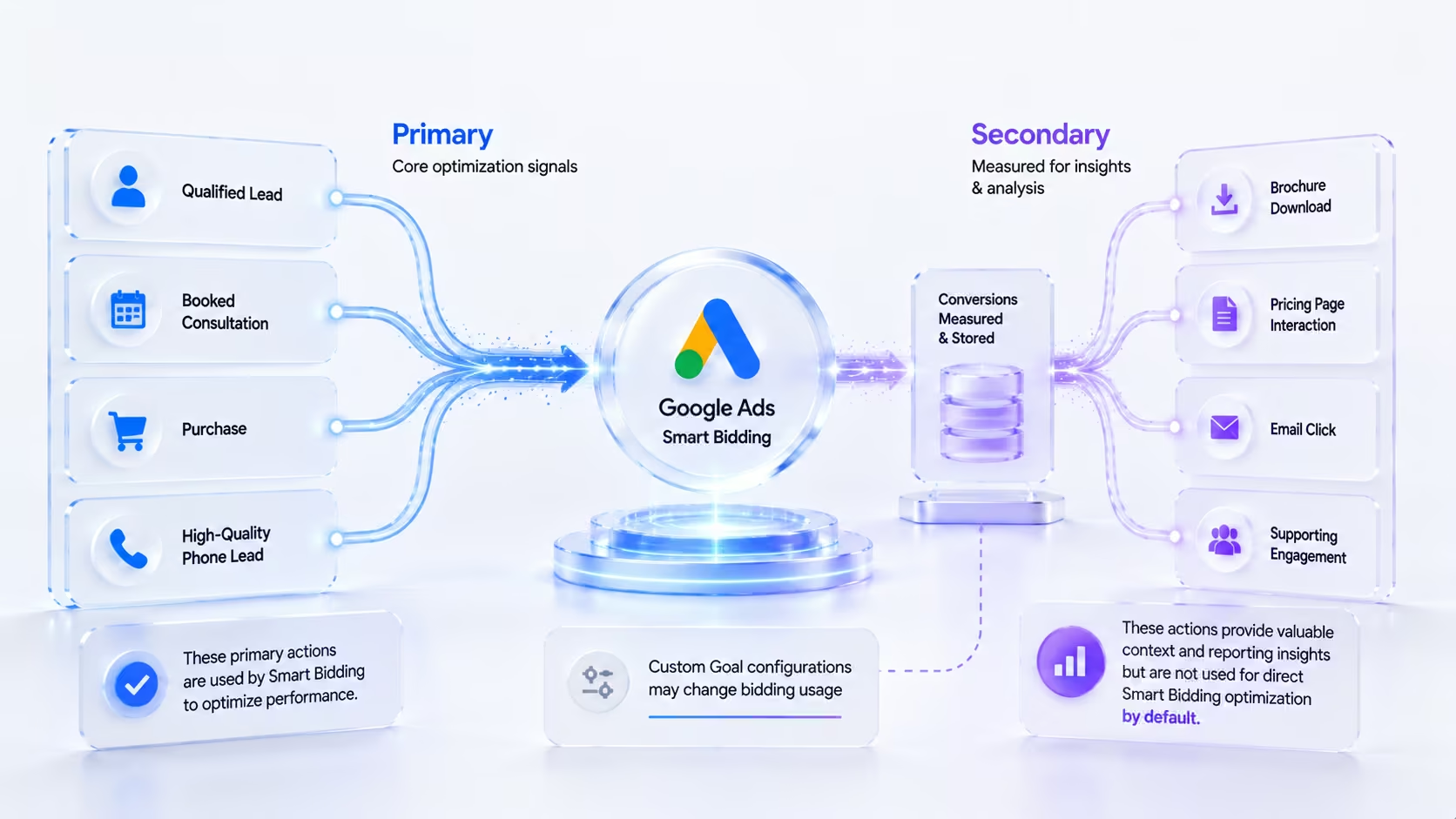
Primary Conversions
Primary conversion actions are generally the outcomes you want included in the main Conversions reporting column and available for bidding when the campaign is optimizing toward the associated goal.
Examples might include:
- Completed purchases
- Qualified form submissions
- Booked consultations
- High-quality phone leads
These should represent outcomes you genuinely want the advertising system to pursue.
Secondary Conversions
Secondary actions are generally used for observation and appear in the All Conversions reporting column rather than acting as normal bidding signals.
Examples could include:
- Brochure downloads
- Email clicks
- Pricing-page interactions
- Lower-intent engagement events
There is an important exception: if a Secondary conversion action is included in a Custom Goal that a campaign uses for optimization, it can still be used for bidding. That is why account audits should review both the conversion action status and the goals assigned to campaigns.
The Audit Mistake We Frequently See
A business defines a low-intent action—such as a generic button click—as a key optimization goal.
The campaign then receives large volumes of apparently inexpensive “conversions,” but sales performance does not improve.
The problem is not Smart Bidding. The problem is that the account told Smart Bidding to pursue the wrong outcome.
Should Google Ads Count One or Every Conversion?
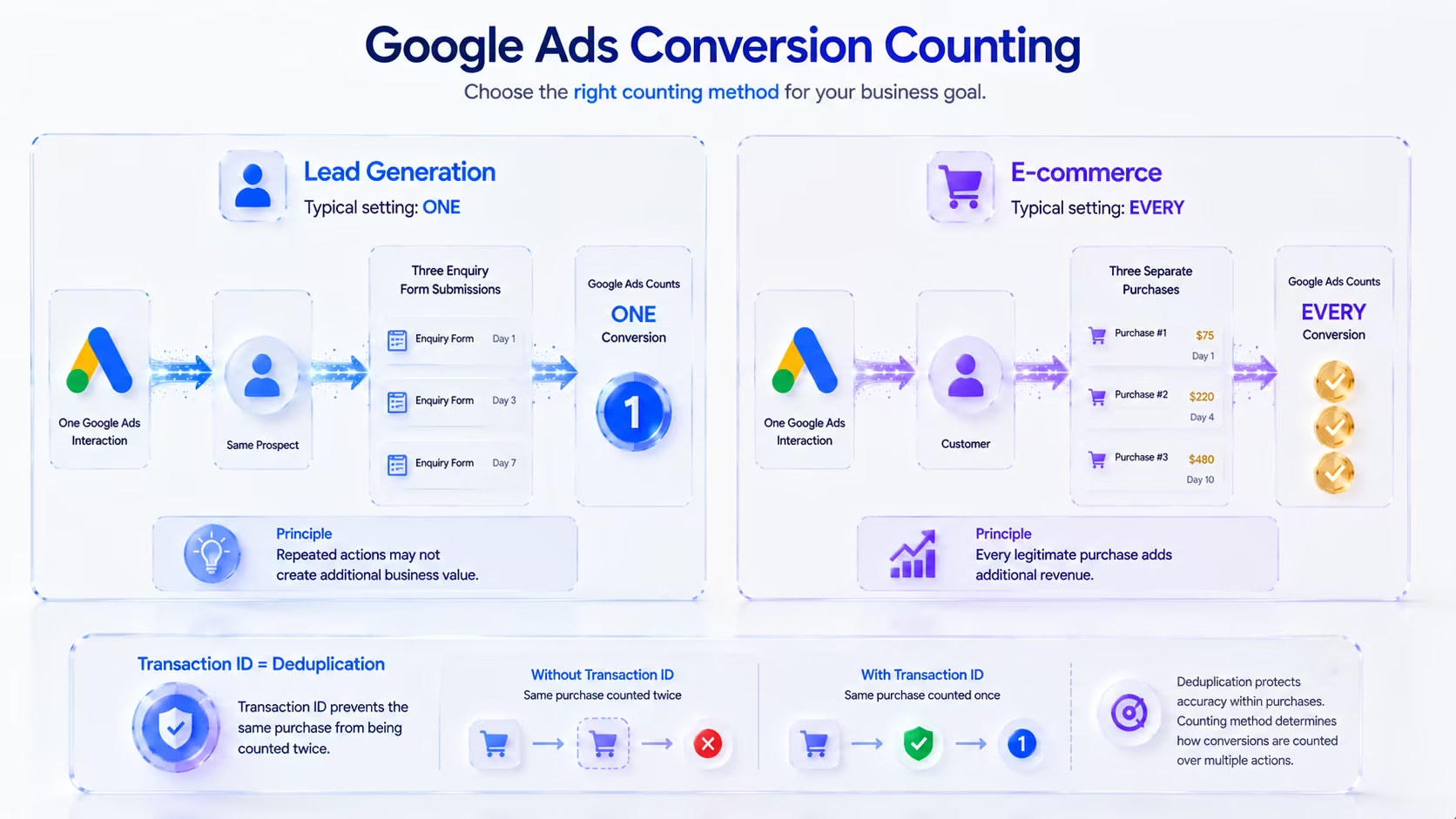
Google Ads lets you decide whether to count one conversion or every conversion that occurs after an eligible ad interaction.
The correct choice depends on whether repeated actions create additional business value.
Use “One” When Repeated Actions Do Not Represent Additional Value
For many lead-generation actions, counting one conversion is the more useful approach. If the same prospect submits the same enquiry multiple times after one ad interaction, three submissions do not necessarily represent three new sales opportunities.
| Business Action | Typical Count Setting |
| Lead form submission | One |
| Consultation request | One |
| Quote request | One |
| Qualified lead | One |
| Purchase | Every |
| Multiple paid transactions | Every |
Use “Every” When Each Conversion Creates Additional Value
E-commerce purchases are the clearest example. If one user makes three legitimate purchases after interacting with your advertising, each transaction generates additional revenue and should normally be measured separately.
For purchases, you should also use a unique transaction or order ID where supported to prevent the same transaction from being counted repeatedly if a confirmation page reloads.
“One” and transaction deduplication solve different problems:
- “One” controls how repeated conversions after an interaction are counted.
- A transaction ID helps prevent the exact same transaction from being recorded twice.
How to Set Conversion Values Correctly
Counting conversions tells you how many actions occurred. Conversion values tell you how much those actions were worth.
This distinction becomes increasingly important when some customers, transactions, or leads are significantly more valuable than others.
E-commerce: Pass Dynamic Revenue
For online purchases, the conversion should ideally receive the actual transaction value. A $75 purchase should not be treated as equal to a $2,500 purchase if your bidding strategy is supposed to maximize revenue.
Passing transaction-specific values gives Google Ads a better view of which conversions generate the greatest commercial return.
Lead Generation: Assign Values Carefully
Lead generation is more difficult because a form submission does not have an immediate transaction value.
You can begin with a fixed value if the leads are reasonably similar. A more mature model is to calculate expected lead value.
For example, if historical sales data shows that:
- 20% of qualified leads become customers
- The average new customer is worth $5,000
The expected value of one qualified lead would be approximately $1,000.
That type of model can become more useful than assigning an arbitrary value to every form submission.
For businesses with sufficient CRM data, passing later-stage or closed-deal values back into Google Ads is stronger still because bidding can move closer to actual revenue.
The objective is not to invent values for the sake of using value-based bidding. The objective is to make the value signal resemble real economics as closely as possible.
Recovering Lost Signals with Enhanced Conversions
Browser privacy restrictions and changes to traditional cookie-based measurement have made some customer journeys harder to connect accurately.
Enhanced Conversions adds eligible first-party customer data to your existing conversion measurement to improve matching. When customers provide information such as an email address or phone number, eligible user-provided data can be securely hashed before being sent to Google and used to improve conversion attribution.
Google Ads can accept eligible user-provided data through website tagging as well as supported Data Manager and API connections, depending on the measurement setup. This matters because Enhanced Conversions should no longer be viewed as one isolated GTM configuration. It is part of a broader first-party measurement setup.
Most importantly, Enhanced Conversions does not fix poor conversion design. If the wrong event is being tracked, the trigger fires twice, or low-value interactions are defined as Primary, adding Enhanced Conversions will not solve the underlying problem. It strengthens a correctly designed measurement system—it does not replace one.
Connecting Google Ads to Real Sales Through Offline Conversion Data
If your business closes sales through a human sales team—such as commercial real estate, B2B services, consulting, or other high-ticket industries in the UAE—a website form is only the beginning of the customer journey.
Optimizing exclusively for raw form submissions creates a serious problem. Google Ads cannot automatically know which enquiries became spam, unqualified leads, qualified opportunities, or closed deals.
If the platform only receives “form submitted,” it may gradually optimize toward users who are easy to generate rather than users who are likely to become profitable customers.
A stronger measurement loop connects advertising activity to CRM outcomes:
[ Ad Interaction ] ──> Captures Lead ──> [ CRM Record ] ──> [ Deal Won ] ──> Uploads Result to Google Ads
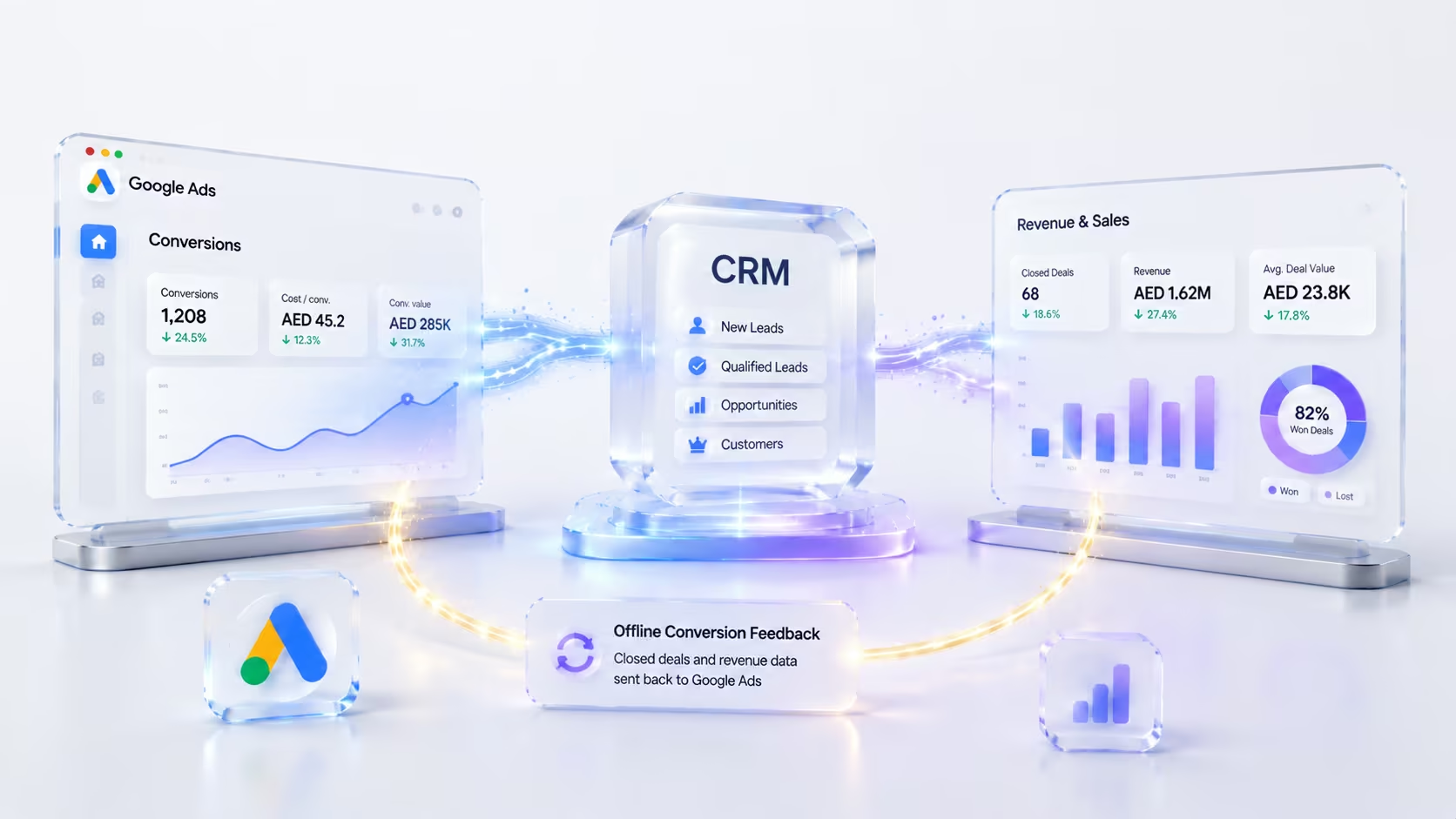
For appropriate implementations, identifiers and eligible first-party data can help connect the original advertising interaction with later CRM outcomes. This allows meaningful downstream milestones—such as Qualified Lead or Deal Won—to become optimization signals instead of forcing the campaign to treat every raw enquiry as equally valuable.
A Note on Implementation Updates
Google has been moving offline conversion and Enhanced Conversions for Leads uploads toward its Data Manager infrastructure. Relevant offline conversion and Enhanced Conversions for Leads uploads are migrating to the Data Manager API and are blocked in older Google Ads API endpoints for setups without legacy access.
Businesses maintaining custom CRM integrations should review older API-based upload workflows rather than assuming a legacy integration will remain standard indefinitely.
The core principle remains unchanged: The closer your Google Ads optimization signal gets to actual revenue, the more useful the bidding data becomes.
Why Google Ads and CRM Data Rarely Match Perfectly
It is extremely common to audit an account where Google Ads displays 50 conversions while the internal CRM records 35 new leads for what appears to be the same period.
That does not automatically mean the tracking is broken. Several structural differences can explain the gap:
- Attribution Dates: Google Ads can report conversions according to the advertising interaction that received conversion credit, while another system may organize records according to when the lead or transaction actually occurred. A prospect might click an ad on Sunday and submit a form several days later.
- Counting Configuration: Your CRM may create one contact record while Google Ads counts conversion actions according to its configured One or Every setting.
- Duplicate and Spam Filtering: CRMs frequently merge duplicate contacts or remove submissions that do not qualify as legitimate leads. Google Ads can only work from the conversion events it receives. If a conversion trigger fires repeatedly without proper deduplication, the advertising platform may record more activity than the CRM considers meaningful.
- Cross-Device and Identity Gaps: Customers do not always convert on the same browser or device they originally used to interact with an ad.
The objective is not perfect numerical equality. The objective is to understand why the numbers differ and ensure those differences are explainable.
4 Frequent Tracking Errors That Drain Ad Budgets
In our audits across GCC ad accounts, we rarely find systems where tracking is missing entirely. More often, the account is sending inaccurate or misleading conversion data back to Google Ads.
1. URL-Based Thank-You Page Triggers Without Deduplication
If a conversion fires every time someone loads /thank-you/, refreshing that page or reopening it can potentially generate another event. For transaction-based conversions, unique transaction IDs should be used where appropriate. For lead-generation forms, tie the conversion directly to a confirmed successful submission rather than a generic page load.
2. Launching Campaigns Without Verification
Installing a tag and immediately increasing campaign spend without testing is a preventable risk. Use appropriate debugging and preview tools to confirm that the correct tag fires only at the intended time, values are populated correctly, and user data is formatted properly before trusting the data for bidding decisions.
3. Website Redesigns That Silently Break Triggers
This happens constantly. A business redesigns its landing pages, changes a contact-form plugin, or updates the site’s code. The new site looks better, but existing GTM triggers were tied to button IDs, CSS classes, or form selectors that no longer exist. Tracking drops to zero overnight while live campaigns continue spending normally.
4. Counting Phone Clicks as Qualified Calls
A click on a tel: link does not prove that a meaningful sales conversation happened. The visitor may cancel the call, disconnect immediately, or dial accidentally. Where your call-tracking setup supports it, evaluate actual call outcomes (such as a minimum call duration threshold) rather than treating every phone-link click as equivalent to a qualified lead.
Practical Google Ads Conversion Tracking Audit Checklist
Before trusting a Google Ads account enough to scale spend, review the following:
| Check | Question |
| Business outcome | Are we tracking an action that actually matters commercially? |
| Primary goals | Are bidding goals limited to meaningful outcomes? |
| Secondary actions | Are supporting events kept separate from core optimization signals? |
| Count setting | Should this action use One or Every? |
| Values | Do conversion values reflect actual or expected business value? |
| Deduplication | Can a refresh or repeated event create false conversions? |
| Transaction IDs | Are unique IDs passed for purchases where appropriate? |
| Tag validation | Has every important action been tested manually? |
| Enhanced Conversions | Is eligible first-party data configured correctly? |
| CRM feedback | Can qualified leads or closed revenue be returned to the advertising system? |
| Backend reconciliation | Are differences between Google Ads and the CRM understood? |
| Change monitoring | Will a redesign or form update trigger a tracking review? |
If several of these questions cannot be answered confidently, the account probably has a measurement problem before it has a bidding problem.
Building a Scalable Data Foundation
Reliable conversion tracking is the baseline of profitable Google Ads management. Clicks and impressions tell you whether advertising generated attention; conversion measurement tells you whether that attention produced business outcomes.
Before raising budgets, changing keyword match types, testing a new bidding strategy, or rewriting landing pages, make sure Google Ads is optimizing toward actions that genuinely matter.
The objective is not to track everything. It is to send Google Ads the clearest possible representation of what creates value for your business.
If you want an objective, expert evaluation of your current Google Ads measurement setup, our team at HD Marketing can audit your conversion actions, bidding signals, tag implementation, and CRM feedback loop to identify where inaccurate data may be limiting campaign performance.
Taking a Broader View: Google Ads tracking is one part of a complete measurement strategy. To understand how conversion measurement works across analytics platforms, paid media, CRM systems, phone calls, and other customer touchpoints, read our comprehensive guide: What Is Conversion Tracking? A Practical Guide for Modern Businesses.